> ## Documentation Index
> Fetch the complete documentation index at: https://docs.cybedefend.com/llms.txt
> Use this file to discover all available pages before exploring further.
# Global Project Management
> Get a high-level view of all your organization’s projects, vulnerabilities, and trends.
**CybeDefend** provides a central dashboard to help you see your organization’s security posture at a glance. This page is your go-to hub for the big-picture stats and aggregated vulnerability data across all projects.
 ## Key Dashboard Sections
1. **High-Risk Projects Count**\
Instantly see how many projects have critical or high-severity vulnerabilities. This allows teams to prioritize resources where they’re needed most.
2. **Recent Activity (7-Day Window)**
* **New Issues**: The number of vulnerabilities discovered in the past week.
* **Resolved Issues**: How many vulnerabilities were fixed over the same period, reflecting your team’s remediation efforts.
3. **Pie Chart: Vulnerabilities by Severity**\
A visual breakdown (Critical, High, Medium, Low) across your entire organization, offering a quick sense of overall risk distribution.
4. **Project List & Severity Counts**\
Below the summary stats, you’ll find a detailed table of all projects. Each row shows:
* **Project Name**
* **Open Vulnerabilities by Severity** (e.g., 2 Critical, 5 High, 8 Medium)
* **Scanner Type Counts** (SAST, IAC, SCA) if you need to see which analysis is flagging the most issues.
## Key Dashboard Sections
1. **High-Risk Projects Count**\
Instantly see how many projects have critical or high-severity vulnerabilities. This allows teams to prioritize resources where they’re needed most.
2. **Recent Activity (7-Day Window)**
* **New Issues**: The number of vulnerabilities discovered in the past week.
* **Resolved Issues**: How many vulnerabilities were fixed over the same period, reflecting your team’s remediation efforts.
3. **Pie Chart: Vulnerabilities by Severity**\
A visual breakdown (Critical, High, Medium, Low) across your entire organization, offering a quick sense of overall risk distribution.
4. **Project List & Severity Counts**\
Below the summary stats, you’ll find a detailed table of all projects. Each row shows:
* **Project Name**
* **Open Vulnerabilities by Severity** (e.g., 2 Critical, 5 High, 8 Medium)
* **Scanner Type Counts** (SAST, IAC, SCA) if you need to see which analysis is flagging the most issues.
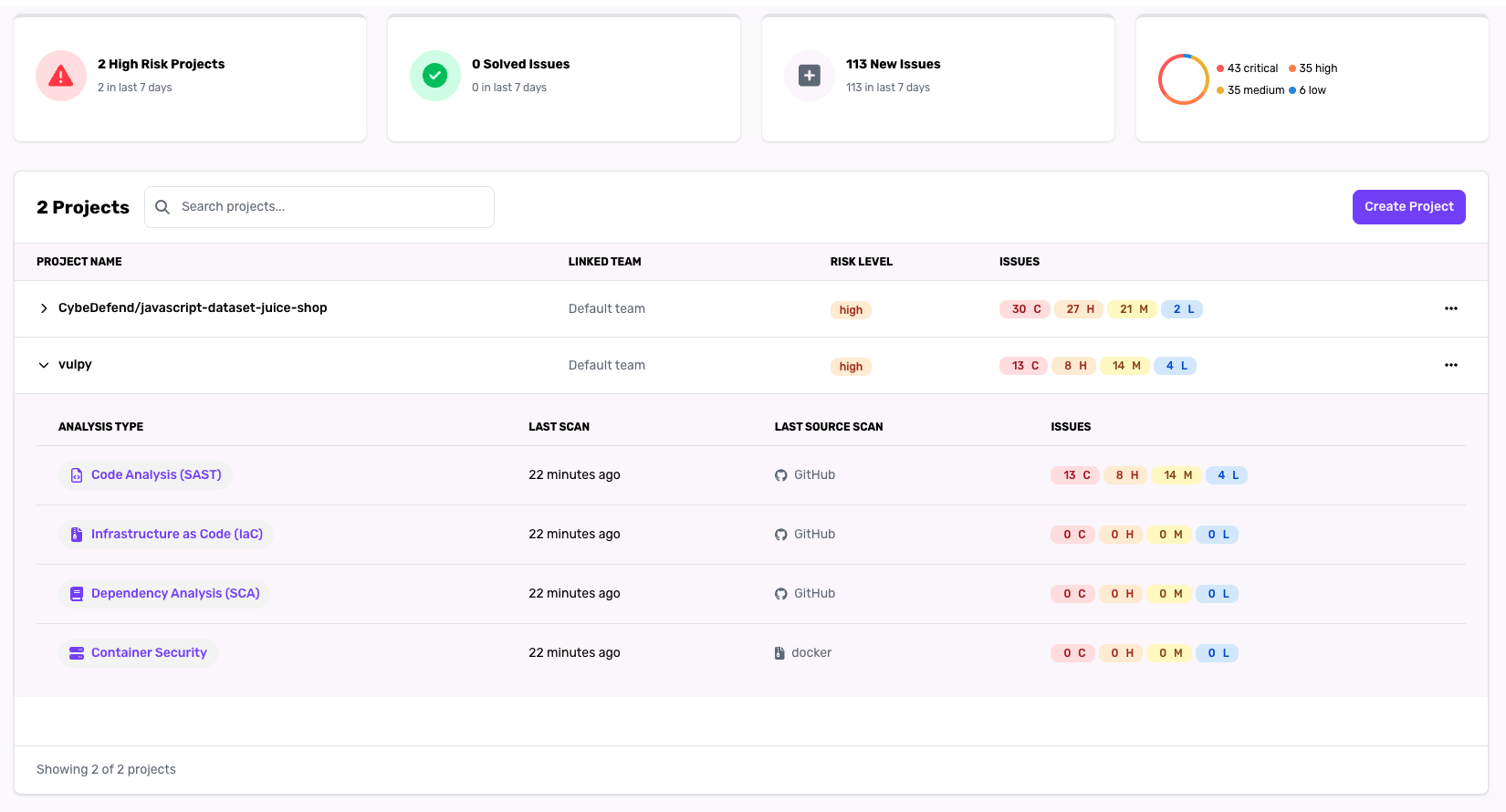 The table supports searching by project name. You can also click a project row to jump into its detailed vulnerability list.
(PS: of course our API is not vulnerable, it's just an example :) )
***
## Recommended Usage
* **Daily Standups**: Quickly identify if any new critical vulnerabilities appeared overnight.
* **Reporting**: Export or screenshot this page for management updates on your organization's security trends.
* **Prioritization**: High-risk projects and spikes in new issues are immediate signals where additional focus may be needed.
Stay proactive by scheduling scans at a higher frequency for your “High-Risk Projects” to detect newly introduced vulnerabilities faster.
The table supports searching by project name. You can also click a project row to jump into its detailed vulnerability list.
(PS: of course our API is not vulnerable, it's just an example :) )
***
## Recommended Usage
* **Daily Standups**: Quickly identify if any new critical vulnerabilities appeared overnight.
* **Reporting**: Export or screenshot this page for management updates on your organization's security trends.
* **Prioritization**: High-risk projects and spikes in new issues are immediate signals where additional focus may be needed.
Stay proactive by scheduling scans at a higher frequency for your “High-Risk Projects” to detect newly introduced vulnerabilities faster.