> ## Documentation Index
> Fetch the complete documentation index at: https://docs.cybedefend.com/llms.txt
> Use this file to discover all available pages before exploring further.
# Personal Access Tokens (PAT)
> Create and use Personal Access Tokens to authenticate the CybeDefend CLI.
A **Personal Access Token (PAT)** lets you authenticate the CybeDefend CLI without going through the browser. It is the recommended authentication method for CI/CD pipelines and scripted environments.
***
## Create a Personal Access Token
1. Log in to the CybeDefend web interface
2. Navigate to **Profile → Personal Access Tokens**
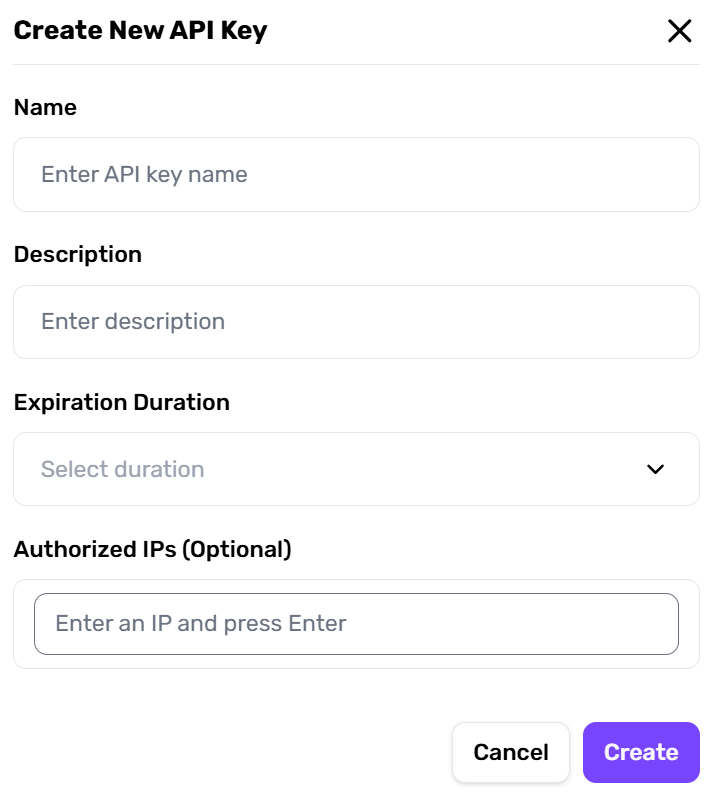
3. Click **+ Create New Token**, give it a name (e.g., "CLI Token")
4. Copy and store the token securely — it is shown only once
 Store your PAT in a secure secrets manager or as an encrypted CI/CD secret. Never commit it to source control.
***
## Authenticate the CLI with Your PAT
```bash theme={null}
cybedefend login --pat YOUR_PAT --region eu
```
Your credentials are saved to `~/.cybedefend/credentials.json`. Subsequent commands (scan, results…) use them automatically — no need to pass `--pat` every time.
Once logged in, the `--region` flag is remembered automatically. You can simply run `cybedefend scan --dir .` for all future commands.
***
## Authenticate via OAuth (interactive)
For local development, you can also log in through your browser:
```bash theme={null}
cybedefend login --region eu
```
This opens the CybeDefend login page in your default browser. After completing authentication, the CLI stores your session automatically. Access tokens are refreshed transparently when they expire.
***
## Use a PAT Without Logging In
For CI/CD environments where persistent sessions are not practical, you can pass the PAT directly via environment variable — no `cybedefend login` step needed:
```bash theme={null}
export CYBEDEFEND_PAT=your_pat_here
cybedefend scan --dir . --project-id YOUR_PROJECT_ID
```
Or inline for a single command:
```bash theme={null}
CYBEDEFEND_PAT=${{ secrets.CYBEDEFEND_PAT }} cybedefend scan --dir . --project-id YOUR_PROJECT_ID
```
## Credential Priority Order
When running any command, credentials are resolved in this order:
1. `--pat` flag (highest priority)
2. `CYBEDEFEND_PAT` environment variable
3. `pat` field in config file (`config.yml`)
4. Stored credentials from `cybedefend login`
## Logout
```bash theme={null}
cybedefend logout
```
Deletes `~/.cybedefend/credentials.json` and clears the stored session.
***
## Next Steps
* [CLI Options for Local Scanner](/latest/code-scanning/local-code-scanning/cli-options)
* [Mac Setup](/latest/code-scanning/local-code-scanning/mac-setup)
* [Windows Setup](/latest/code-scanning/local-code-scanning/windows-setup)
* [Linux Setup](/latest/code-scanning/local-code-scanning/linux-setup)
Store your PAT in a secure secrets manager or as an encrypted CI/CD secret. Never commit it to source control.
***
## Authenticate the CLI with Your PAT
```bash theme={null}
cybedefend login --pat YOUR_PAT --region eu
```
Your credentials are saved to `~/.cybedefend/credentials.json`. Subsequent commands (scan, results…) use them automatically — no need to pass `--pat` every time.
Once logged in, the `--region` flag is remembered automatically. You can simply run `cybedefend scan --dir .` for all future commands.
***
## Authenticate via OAuth (interactive)
For local development, you can also log in through your browser:
```bash theme={null}
cybedefend login --region eu
```
This opens the CybeDefend login page in your default browser. After completing authentication, the CLI stores your session automatically. Access tokens are refreshed transparently when they expire.
***
## Use a PAT Without Logging In
For CI/CD environments where persistent sessions are not practical, you can pass the PAT directly via environment variable — no `cybedefend login` step needed:
```bash theme={null}
export CYBEDEFEND_PAT=your_pat_here
cybedefend scan --dir . --project-id YOUR_PROJECT_ID
```
Or inline for a single command:
```bash theme={null}
CYBEDEFEND_PAT=${{ secrets.CYBEDEFEND_PAT }} cybedefend scan --dir . --project-id YOUR_PROJECT_ID
```
## Credential Priority Order
When running any command, credentials are resolved in this order:
1. `--pat` flag (highest priority)
2. `CYBEDEFEND_PAT` environment variable
3. `pat` field in config file (`config.yml`)
4. Stored credentials from `cybedefend login`
## Logout
```bash theme={null}
cybedefend logout
```
Deletes `~/.cybedefend/credentials.json` and clears the stored session.
***
## Next Steps
* [CLI Options for Local Scanner](/latest/code-scanning/local-code-scanning/cli-options)
* [Mac Setup](/latest/code-scanning/local-code-scanning/mac-setup)
* [Windows Setup](/latest/code-scanning/local-code-scanning/windows-setup)
* [Linux Setup](/latest/code-scanning/local-code-scanning/linux-setup)