> ## Documentation Index
> Fetch the complete documentation index at: https://docs.cybedefend.com/llms.txt
> Use this file to discover all available pages before exploring further.
# Cybe AutoFix
> How to configure and use Cybe AutoFix for intelligent, context-aware vulnerability remediation.
Cybe AutoFix is CybeDefend's AI agent that automatically generates intelligent, context-aware fixes for detected vulnerabilities and creates pull requests in your repository.
***
## How Cybe AutoFix Works
Cybe AutoFix leverages our proprietary **knowledge graph** to understand the full context of each vulnerability before generating a fix. Unlike traditional autofix tools that apply generic patches, Cybe AutoFix:
* Analyzes the vulnerability's root cause
* Understands how the fix impacts surrounding code
* Ensures fixes maintain code quality and architectural patterns
* Generates production-ready, developer-friendly code
***
## Configuration
### Requirements
**Cybe AutoFix requires**:
* Project must be linked to **GitHub** or **GitLab**
* Repository write permissions for pull request creation
### Enable Cybe AutoFix
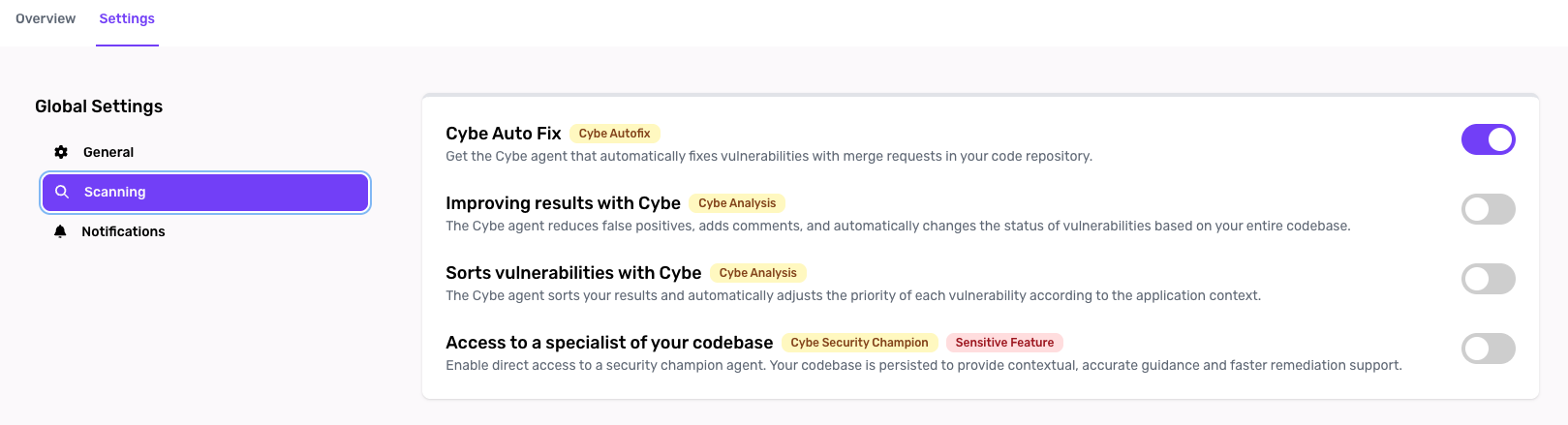 1. Navigate to **Project Settings**
2. Ensure your project is **linked to GitHub or GitLab**
3. Verify **Cybe Analysis is enabled** (required for knowledge graph)
4. Find the **Cybe AutoFix** section
5. Toggle **Enable Cybe AutoFix**
6. Save your settings
***
## Using Cybe AutoFix
### Automatic Fix Generation
When Cybe AutoFix is enabled:
1. Navigate to a **confirmed vulnerability** in your project
2. Click the **"Generate Fix"** button
3. Cybe AutoFix analyzes the vulnerability using the knowledge graph
4. A **pull request is automatically created** in your repository
***
## Review & Merge
**Always review Cybe AutoFix pull requests** before merging. While the AI generates high-quality fixes, human validation ensures alignment with business requirements.
### Merge Workflow
1. **Review the PR** in GitHub/GitLab
2. **Run your CI/CD pipeline** to validate the fix
3. **Request team review** if needed for critical changes
4. **Merge** when satisfied with the fix
5. **Mark vulnerability as resolved** in CybeDefend
***
## Supported Platforms
* **GitHub**: Full support for public and private repositories
* **GitLab**: Full support for SaaS and self-managed instances
***
## Requirements
* ✅ Project linked to GitHub or GitLab
* ✅ Cybe Analysis enabled (for knowledge graph)
* ✅ Repository write permissions
* ✅ Sufficient Cybe AutoFix credits in your subscription
***
**Related:** [Cybe Analysis](/latest/agent-ai-integration/cybe-analysis-detail) · [Cybe Security Champion](/latest/agent-ai-integration/cybe-security-champion-detail) · [AI Usage Tracking](/latest/plateform-overview/plan-&-pricing/ai-usage-tracking)
1. Navigate to **Project Settings**
2. Ensure your project is **linked to GitHub or GitLab**
3. Verify **Cybe Analysis is enabled** (required for knowledge graph)
4. Find the **Cybe AutoFix** section
5. Toggle **Enable Cybe AutoFix**
6. Save your settings
***
## Using Cybe AutoFix
### Automatic Fix Generation
When Cybe AutoFix is enabled:
1. Navigate to a **confirmed vulnerability** in your project
2. Click the **"Generate Fix"** button
3. Cybe AutoFix analyzes the vulnerability using the knowledge graph
4. A **pull request is automatically created** in your repository
***
## Review & Merge
**Always review Cybe AutoFix pull requests** before merging. While the AI generates high-quality fixes, human validation ensures alignment with business requirements.
### Merge Workflow
1. **Review the PR** in GitHub/GitLab
2. **Run your CI/CD pipeline** to validate the fix
3. **Request team review** if needed for critical changes
4. **Merge** when satisfied with the fix
5. **Mark vulnerability as resolved** in CybeDefend
***
## Supported Platforms
* **GitHub**: Full support for public and private repositories
* **GitLab**: Full support for SaaS and self-managed instances
***
## Requirements
* ✅ Project linked to GitHub or GitLab
* ✅ Cybe Analysis enabled (for knowledge graph)
* ✅ Repository write permissions
* ✅ Sufficient Cybe AutoFix credits in your subscription
***
**Related:** [Cybe Analysis](/latest/agent-ai-integration/cybe-analysis-detail) · [Cybe Security Champion](/latest/agent-ai-integration/cybe-security-champion-detail) · [AI Usage Tracking](/latest/plateform-overview/plan-&-pricing/ai-usage-tracking)